
Your Ultimate Pool Chlorinator Troubleshooting Guide
Before we show you the steps you can take to troubleshoot your saltwater chlorinator, let’s briefly touch on how chlorinators work. A chlorine generator's main function is to produce chlorine, so you do not have to do it manually. Every pool needs to be sanitised. Once the pool filter has removed the large organic material that algae and bacteria feed on, the chlorinator’s job is to destroy all the remaining bacteria and algae, which can be dangerous to swimmers.
To put it simply, saltwater chlorinators use an electrolytic cell to sanitise your swimming pool by adding a small amount of salt (sodium chloride) to your pool water, and the cell converts the chloride contained in the salt water into chlorine to keep your pool sanitised. Alternatively, you can use many of the mineral blends available on the market with a chlorine generator to add that little bit of luxury to your swimming pool.

Now you know the essential role saltwater chlorinators play in maintaining your pool health, and you know that when they fail to produce enough chlorine to meet the swimming pool needs, it can quickly result in unhealthy pool water and potential algae formation.
Keep in mind that a chlorinator has three primary components: the main unit/controller, the cell/electrode, and the cell cable. Here we have put together a comprehensive guide that can help you tackle the situation when you run into an error displayed on your chlorinator:
| Fault Indication | Solutions |
|---|---|
No Power/Display Blank If the control panel has no indicator lights, that’s a good sign of no power. | • Switch off the chlorinator (“Power” button) and switch off the power supply to the control box, then check that all the wires are properly connected (mains power supply, cell, etc.) • Do a hard reset: Most of our chlorinators have a factory reset option, which can allow you to clear the fault. Contact our Customer Care Team for instructions on how to do this, depending on your model. • Press the UP and DOWN buttons at the same time until the unit turns off. Most times, this clears the fault, if not, the unit needs to be assessed and repaired by a qualified pool technician. (Please note that once the unit is reset, it will have to be reprogrammed with the time and timers.) • If the fuse is blown, you need to contact a qualified pool technician for repair |
No Flow The saltwater chlorinator needs a sufficient flow of water for effective operation. Flow rates can be reduced by clogged pump or skimmer baskets, dirty filters, or closed directional valves. A no flow error is a built-in safety protocol whereby if the sensor detects no water, then it shuts off the cell and pump to avoid damage. | • Ensure the valves/pump are on, and the sense wire is connected to the cell. • Check the cell – is it full of water? Are there any large air bubbles? If so, you need to make sure the cell is full. Ensure that the water is at least covering the small tab inside the cell connected to the blue lead, this is the flow sensor and a ‘no flow’ will trigger if this does not have any water passing over it • Is there any buildup on the cell – if so, clean the cell. Also, check the pump, the filter, the skimmer(s), and the bypass valve(s). Clean them if necessary. • How old is the cell? No flow could be one of the signs the cell is reaching the end of it’s working life • Is the pump running? – If the unit has not switched on the pump, it’s normal for the No Flow light to be on. • Note: Sometimes, when there is No Flow, the chlorinator will switch off the pump to protect the pump from running dry – so make sure there is enough water in the cell. |
Low salt 1. The Salt Cell needs a certain amount of salt in the water to convert the salty water to chlorine. The correct salt level is important to cell life and the effective operation of your chlorinator. A typical pool of around 50,000 litres requires 200kg of salt to initially set up the pool to 4,000ppm. 2. Always check the product manual or your local pool professional to know the required salt levels for your chlorinator. Please avoid randomly adding salt simply because you think it's needed. | • Do a salt test, and if the salt level is too low, add two 25kg bags of salt to the shallow end of your pool. Run the filter for approx. 6 hours to help mix the salt in the pool. This can take up to 24 hours to fully dissolve. • Check the cell for build-up. Clean the cell and retry. • If the low salt light is still on, then you should get your pool water tested using a salt tester or a test strip. If the Salinity is above 4000ppm, then you may need to have your Chlorinator checked. • Raise your water temperature. The colder the water, the higher the salt level needs to be. • Perform the quick Skimmer Test – Turn the chlorinator on, get a handful of salt and throw it into the skimmer box, check the chlorinator box, if the light goes out, they just need more salt, if the light stays on, there may be another issue. • How old is the cell? Low Salt could be one of the signs the cell is reaching the end of its working life (most cells have between 10,000 and 20,000 hours of operation) |
Calcium too high High calcium levels in the chlorinator cell can cause scaling on the electrodes and affect its functioning. Scale deposits are caused either by high calcium concentration, high pH, or high alkalinity. If you see scale build-up, clean the cell for optimal performance, and prevent permanent damage to the chlorinator cell. | If you have a non-reversing chlorinator, you should aim to check your cell every fortnight during the peak of the season. If you have a self-cleaning model, you should check it every 3-4 weeks. Visually check the electrode and ensure that there are no scale deposits. If there are scale deposits on your cell, then you will need to clean it. We recommend you use a cell cleaning solution from your pool professional, as acid can be dangerous. Allow the cleaning solution to dissolve the calcium deposits for about 10 minutes before you rinse the electrode in clean water and refit it into the cell housing. |
The light is not turning on | • If a Light Timer is set, but the light is set to ON or OFF instead of AUTO, you need to use the “LIGHT” button or RF remote control to set the Light to AUTO mode • If a Light Timer is set, but the control unit is not set to AUTO, you need to ensure the Control Unit is in AUTO mode |
Low/No chlorine production The factors that affect chlorine levels include the summer heat, poor filtration, bather load, and the frequency of use. It’s also possible that the time period you set is too short, the chlorine output level is too low, or the filter needs backwashing. During a hot summer day, the chlorine levels can even drop by up to 90%. You should check the free chlorine levels once a week and adjust the chlorinator accordingly. | • Make sure the cables are connected to the cell. • Try increasing the chlorine output level. (Run at 100% to test if you can see mist coming off the cell) • If the chlorine level is a bit low, then the Zodiac saltwater chlorinator has a boost button that will super-chlorinate your pool. If you don't have a Zodiac branded chlorinator, then you might have to shock your pool. After shocking your pool, run the pool pump and allow one hour for the sensor to read chlorine levels. • Increase the timer period and backwash your filter. • Increase water temperature or salt level. |
pH too high/low You should keep your pH level between 7.0 and 7.4 for fibreglass pools and 7.2 to 7.8 for other pools. You might see this warning if the pH level is less than 5. | • It’s possible that the pH sensor is disconnected. Check the pH sensor wiring on the control box and on the sensor holder. • Check the pH level in the pool using a photometer or a test strip. Also, check and adjust alkalinity. • In cases when the probe/sensor malfunctions, you need to clean and calibrate the probe/sensor. Watch the videos below to see how to clean and calibrate your probe/sensor: Check the operation of the sensor using a sensor tester (ask your pool specialist). |
Chlorine too high | • Reduce to between 600 and 650 mv ORP • Test Total Alkalinity and adjust to 80 to 120 ppm • If the ORP sensor is not immersed, you need to install the sensor chamber so that it is always in pool water. |
The Chlorinator says TEST CELL | • This happens on the EI models after 9000 cell operation hours • To clear the message, please follow these steps: – Press and hold the MINUTE button until the hours for the power pack and the cell are displayed. – Press the HOUR button once to reset the hours for the cell. – Your chlorinator will revert back to the main menu in a few minutes, and you will see that the message is gone |
No Power/Display Blank
If the control panel has no indicator lights, that’s a good sign of no power.
• Switch off the chlorinator (“Power” button) and switch off the power supply to the control box, then check that all the wires are properly connected (mains power supply, cell, etc.)
• Do a hard reset: Most of our chlorinators have a factory reset option, which can allow you to clear the fault. Contact our Customer Care Team for instructions on how to do this, depending on your model.
• Press the UP and DOWN buttons at the same time until the unit turns off. Most times, this clears the fault, if not, the unit needs to be assessed and repaired by a qualified pool technician. (Please note that once the unit is reset, it will have to be reprogrammed with the time and timers.)
• If the fuse is blown, you need to contact a qualified pool technician for repair
No Flow
The saltwater chlorinator needs a sufficient flow of water for effective operation. Flow rates can be reduced by clogged pump or skimmer baskets, dirty filters, or closed directional valves.
A no flow error is a built-in safety protocol whereby if the sensor detects no water, then it shuts off the cell and pump to avoid damage.
• Ensure the valves/pump are on, and the sense wire is connected to the cell.
• Check the cell – is it full of water? Are there any large air bubbles? If so, you need to make sure the cell is full. Ensure that the water is at least covering the small tab inside the cell connected to the blue lead, this is the flow sensor and a ‘no flow’ will trigger if this does not have any water passing over it
• Is there any buildup on the cell – if so, clean the cell. Also, check the pump, the filter, the skimmer(s), and the bypass valve(s). Clean them if necessary.
• How old is the cell? No flow could be one of the signs the cell is reaching the end of it’s working life
• Is the pump running? – If the unit has not switched on the pump, it’s normal for the No Flow light to be on.
• Note: Sometimes, when there is No Flow, the chlorinator will switch off the pump to protect the pump from running dry – so make sure there is enough water in the cell.
Low salt
1. The Salt Cell needs a certain amount of salt in the water to convert the salty water to chlorine. The correct salt level is important to cell life and the effective operation of your chlorinator. A typical pool of around 50,000 litres requires 200kg of salt to initially set up the pool to 4,000ppm.
2. Always check the product manual or your local pool professional to know the required salt levels for your chlorinator. Please avoid randomly adding salt simply because you think it's needed.
• Do a salt test, and if the salt level is too low, add two 25kg bags of salt to the shallow end of your pool. Run the filter for approx. 6 hours to help mix the salt in the pool. This can take up to 24 hours to fully dissolve.
• Check the cell for build-up. Clean the cell and retry.
• If the low salt light is still on, then you should get your pool water tested using a salt tester or a test strip. If the Salinity is above 4000ppm, then you may need to have your Chlorinator checked.
• Raise your water temperature. The colder the water, the higher the salt level needs to be.
• Perform the quick Skimmer Test – Turn the chlorinator on, get a handful of salt and throw it into the skimmer box, check the chlorinator box, if the light goes out, they just need more salt, if the light stays on, there may be another issue.
• How old is the cell? Low Salt could be one of the signs the cell is reaching the end of its working life (most cells have between 10,000 and 20,000 hours of operation)
Calcium too high
High calcium levels in the chlorinator cell can cause scaling on the electrodes and affect its functioning. Scale deposits are caused either by high calcium concentration, high pH, or high alkalinity. If you see scale build-up, clean the cell for optimal performance, and prevent permanent damage to the chlorinator cell.
If you have a non-reversing chlorinator, you should aim to check your cell every fortnight during the peak of the season. If you have a self-cleaning model, you should check it every 3-4 weeks.
Visually check the electrode and ensure that there are no scale deposits. If there are scale deposits on your cell, then you will need to clean it. We recommend you use a cell cleaning solution from your pool professional, as acid can be dangerous. Allow the cleaning solution to dissolve the calcium deposits for about 10 minutes before you rinse the electrode in clean water and refit it into the cell housing.
The light is not turning on
• If a Light Timer is set, but the light is set to ON or OFF instead of AUTO, you need to use the “LIGHT” button or RF remote control to set the Light to AUTO mode
• If a Light Timer is set, but the control unit is not set to AUTO, you need to ensure the Control Unit is in AUTO mode
Low/No chlorine production
The factors that affect chlorine levels include the summer heat, poor filtration, bather load, and the frequency of use. It’s also possible that the time period you set is too short, the chlorine output level is too low, or the filter needs backwashing.
During a hot summer day, the chlorine levels can even drop by up to 90%. You should check the free chlorine levels once a week and adjust the chlorinator accordingly.
• Make sure the cables are connected to the cell.
• Try increasing the chlorine output level. (Run at 100% to test if you can see mist coming off the cell)
• If the chlorine level is a bit low, then the Zodiac saltwater chlorinator has a boost button that will super-chlorinate your pool. If you don't have a Zodiac branded chlorinator, then you might have to shock your pool. After shocking your pool, run the pool pump and allow one hour for the sensor to read chlorine levels.
• Increase the timer period and backwash your filter.
• Increase water temperature or salt level.
pH too high/low
You should keep your pH level between 7.0 and 7.4 for fibreglass pools and 7.2 to 7.8 for other pools. You might see this warning if the pH level is less than 5.
• It’s possible that the pH sensor is disconnected. Check the pH sensor wiring on the control box and on the sensor holder.
• Check the pH level in the pool using a photometer or a test strip. Also, check and adjust alkalinity.
• In cases when the probe/sensor malfunctions, you need to clean and calibrate the probe/sensor. Watch the videos below to see how to clean and calibrate your probe/sensor:
Check the operation of the sensor using a sensor tester (ask your pool specialist).
Chlorine too high
• Reduce to between 600 and 650 mv ORP
• Test Total Alkalinity and adjust to 80 to 120 ppm
• If the ORP sensor is not immersed, you need to install the sensor chamber so that it is always in pool water.
The Chlorinator says TEST CELL
• This happens on the EI models after 9000 cell operation hours
• To clear the message, please follow these steps:
– Press and hold the MINUTE button until the hours for the power pack and the cell are displayed.
– Press the HOUR button once to reset the hours for the cell.
– Your chlorinator will revert back to the main menu in a few minutes, and you will see that the message is gone
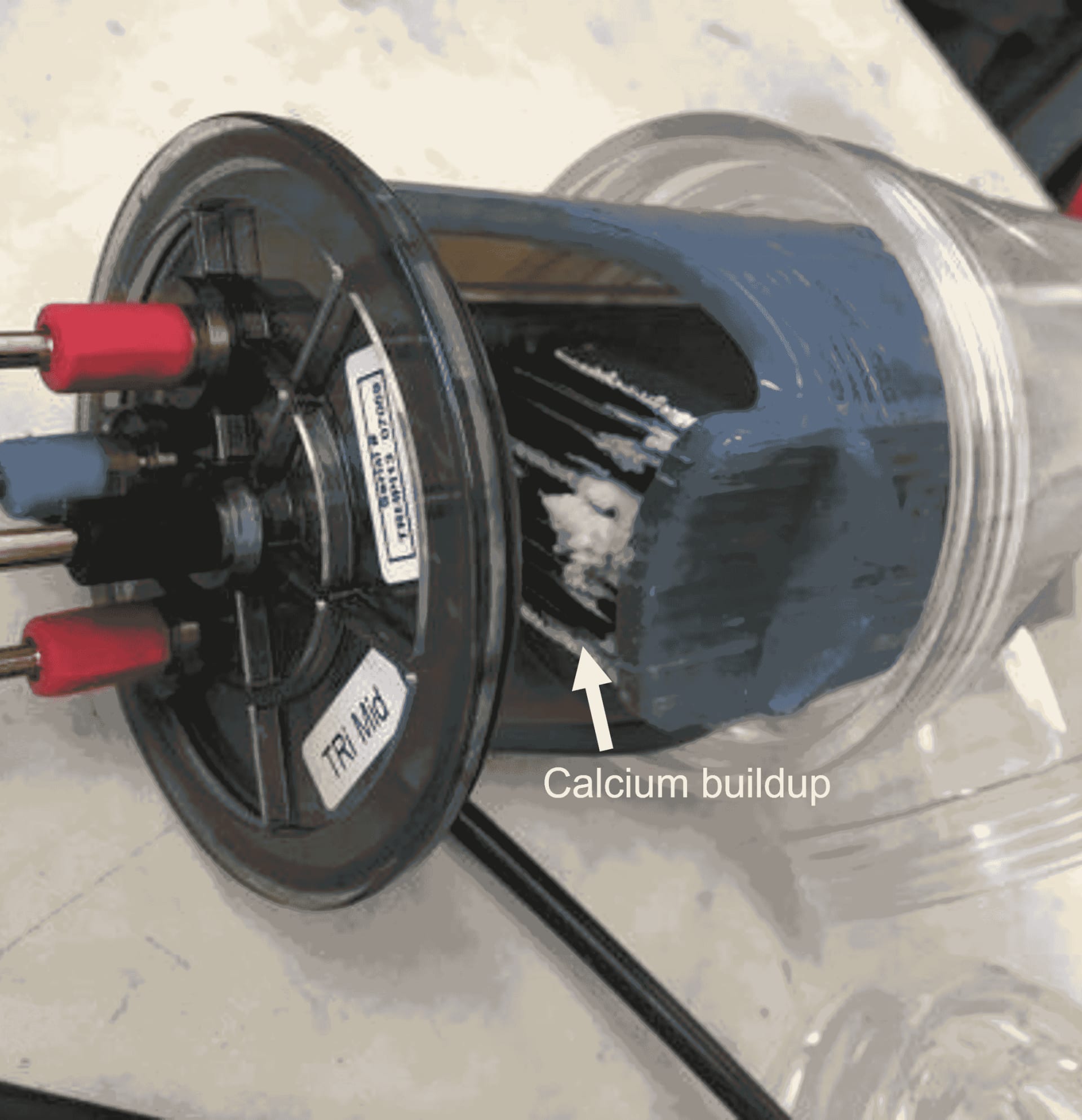
Please note that if the water chemistry of the pool is unbalanced, calcium buildup might occur over the cell plates, affecting the longevity and efficiency of your salt chlorinator and as a result, could affect the validity of your warranty claim. Salt cells generally last 3-5 years, sometimes more or less. Their lifespan varies according to factors like water chemistry, temperature, and maintenance. Follow this maintenance schedule to ensure your chlorinator’s optimumperformance:
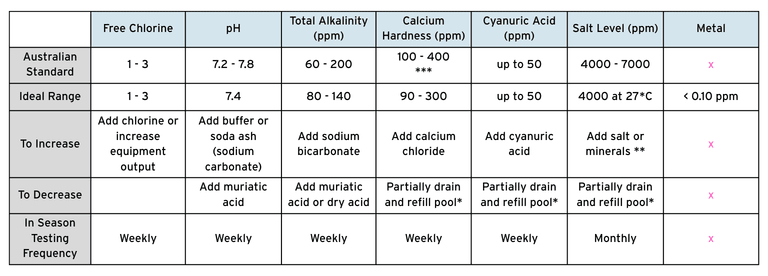
NOTE: Test all equipment sensors quarterly.
*Fill the pool with water from the mains water supply. Do not use rain water or well water.
**Do not add salt directly into the skimmer. Always add it to the shallow end of the swimming pool to help it evenly disperse. Do not initiate electrolysis until salt has fully dissolved. Remember to only use a good quality refined salt when adding salt to the water of your pool, cheap salt can stain your pool surface.
***Reading is True Calcium Hardness, not Total Hardness.
If you are still having issues with your chlorinator, contact our Customer Care Team via LIVE CHAT or your local pool dealers to let us know what kind of checks you have done so far, so that we can help identify and fix the problem for you.